Deep dive
Building a 3D material workflow in the browser
Introduced in v0.36.0 · Verified in v0.41.2
Artifact treats a 3D scene as an editable source inside the same document—not as a second editor with a separate export path.
One document, not two editors
Introduced in v0.36.0 · Verified in v0.41.2
The first 3D release reused Artifact’s document and graph boundaries instead of placing a separate scene editor beside them.
Artifact began with an environment-map experiment intended for use in Blender. More control required more than exporting another texture. The editor needed to keep the model, environment, camera, lighting, effects, and final output connected as editable decisions.
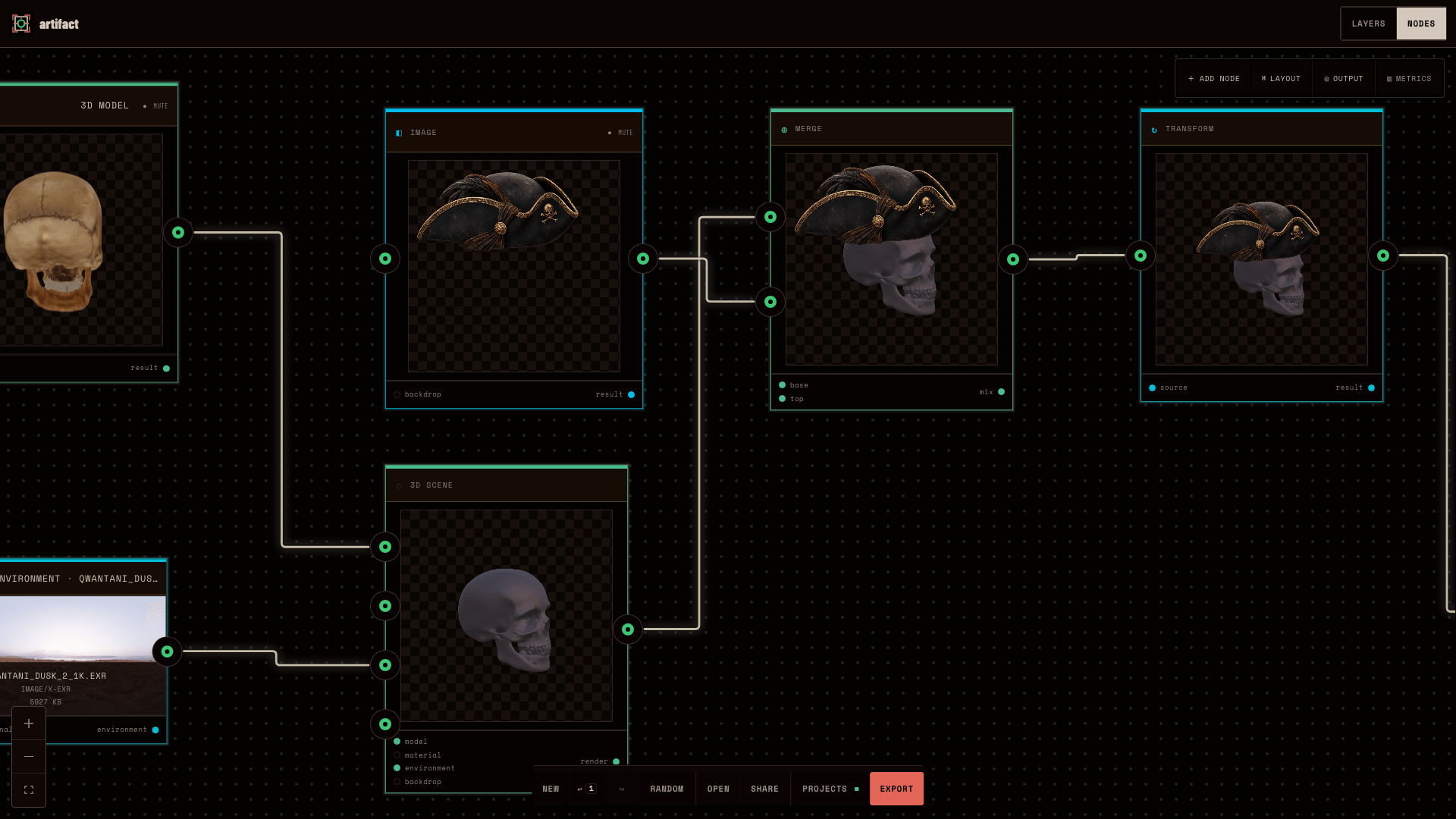
v0.36.0 introduced GLB and GLTF models, HDR and EXR environments, and a 3D Scene node. The scene produces a raster result inside the existing graph, so transforms, color operations, retro effects, and export continue without a special 3D-only branch.
Inside the retained v0.36 document
Model input
The package embeds the 2.0 MB skull.glb payload and restores it under the same stable model reference before opening the graph.
Lighting environment
The 6.1 MB Qwantani Dusk EXR travels with the project and is restored independently under its stable environment reference.
3D Scene
The scene combines model, camera, lighting, environment rotation, and backdrop into one raster output.
2D finish and export
Retro Resolution, Indexed Palette, Dot Grain, and Silhouette Crush continue after the scene before a 3× PNG export.
Why it matters. The document preserves more than a flattened image: its graph, scene settings, effects, export target, model, and environment all survive a clean-context round trip.
The scene owns 3D state
Introduced in v0.36.0 · Verified in v0.41.2
The model, environment, scene, and document renderer each own a different kind of state.
A model asset should not silently own the camera or lighting that happens to make it look good in one composition. Artifact keeps the imported model and environment as inputs, then gives camera, light, backdrop, and environment settings to the scene that combines them.
That separation also keeps replacement local. An author can rotate the environment without touching geometry, replace the model without discarding the scene setup, or run the scene through another finish without changing the WebGL objects used to render it.
Scene ownership
Model input
Owns the imported GLB or GLTF asset and its object transform, not the camera or final lighting.
Environment input
Owns an HDR or EXR source that can be replaced or reused without rebuilding the model node.
Scene node
Owns camera state, backdrop, lights, environment intensity and rotation, then exposes one compositable result.
Document renderer
Treats the scene output like other visual sources so preview, downstream effects, and export share the same path.
Why it matters. Serializable inputs and scene settings belong to the document. Three.js objects, loaders, caches, and disposal stay in the renderer, where runtime resources can change without changing the saved format.
Materials become graph inputs
Introduced in v0.37.0 · Verified in v0.41.2
v0.37.0 moved material decisions into the graph instead of hiding appearance inside each imported model.
The first 3D workflow could import and light a model, but material control still needed a clear authoring surface. The following release added a PBR Material node with editable values and connectable texture maps. Geometry, material, and environment could now evolve independently.
The material remains part of the same renderer contract as the scene. A node thumbnail can preview it, the live scene can use it, and export resolves the same graph state. The editor does not maintain a simplified preview material that drifts from the final output.
What became explicit in v0.37
Editable values
Base and accent color, metalness, roughness, clearcoat, relief, and grain stay explicit in document state.
Texture maps
Albedo, roughness, metalness, normal, and alpha inputs can be connected instead of being hidden inside a model import.
Reusable connection
The material can feed compatible primitive or scene slots, keeping appearance separate from geometry and lighting.
One render contract
Node thumbnail, live preview, and export resolve the same graph-defined material rather than approximating it in separate paths.
Why it matters. A look becomes a reusable, editable relationship between values, texture maps, geometry, and lighting—not an opaque property of one imported file.
Keep the boundary visible
Introduced in v0.36.0 · Verified in v0.41.2
The workflow is intentionally narrower than a desktop 3D package, and the release record keeps those limits visible.
Artifact can compose a prepared model, tune its scene, connect a PBR material, apply the same 2D effects used elsewhere in the editor, and export the result. That is enough for cover and poster experiments without pretending the browser editor owns every stage of 3D production.
Current limits are product boundaries rather than missing footnotes. Model editing, animation, broad interchange support, advanced texture packing, and a reusable material library still belong to future work or specialist tools.
The current boundary
It is not a general 3D editor
Artifact imports prepared models and exposes composition controls; it does not replace mesh editing, rigging, or animation tools.
Older packages cannot recreate omitted assets
Packages exported before v0.41.1 still need the original files because those bytes were never stored. v0.41.2 adds a truthful missing state and in-place GLB recovery without breaking graph connections.
Materials are useful, not exhaustive
v0.37 does not claim map transforms, channel packing, reusable material packs, or a material marketplace.
3D cost is loaded on demand
Three.js and 3D loaders stay lazy so a 2D document does not pay the full 3D startup cost merely because the editor supports it.
Why it matters. A focused workflow is easier to keep editable and predictable. It also lets 2D-only documents avoid the weight and complexity of the 3D runtime.
Release, implementation, and test evidence
- v0.36.0 3D scene release (opens in new tab)
The release record for GLB and GLTF import, 3D Model and Environment inputs, scene controls, retro effects, and preview/export parity.
- v0.37.0 PBR material release (opens in new tab)
The release record for graph-native PBR materials, texture-map inputs, explicit HDR and EXR environments, and lazy Three.js loading.
- v0.41.1 3D package portability patch (opens in new tab)
The patch that embeds imported GLB, GLTF, HDR, and EXR payloads and restores them before opening a package in a clean browser.
- v0.41.2 missing-asset recovery patch (opens in new tab)
The follow-up that distinguishes missing from invalid models and lets an older package reattach a GLB without losing its graph connections.
- Three.js model renderer (opens in new tab)
The runtime boundary that lazily loads GLTF and EXR support, resolves model and environment sources, and renders scene state.
- 3D viewport implementation (opens in new tab)
The live scene surface that applies camera, lighting, environment, material, and resource-disposal behavior.
- 3D browser regression path (opens in new tab)
Browser coverage for importing a model, building a 3D scene, applying the retro finish, and retaining preview/export behavior.
Why it matters. The retained project file shows one real composition. Release notes, renderer code, and browser coverage establish which parts are maintained product behavior rather than observations from that file alone.