Deep dive
Making AI-generated shaders editable
Introduced in v0.40.0 · Verified in v0.41.0
Artifact does not treat generated GLSL as finished output. The browser compiles and inspects each candidate before it can replace current work.
One production run, three inspectable states
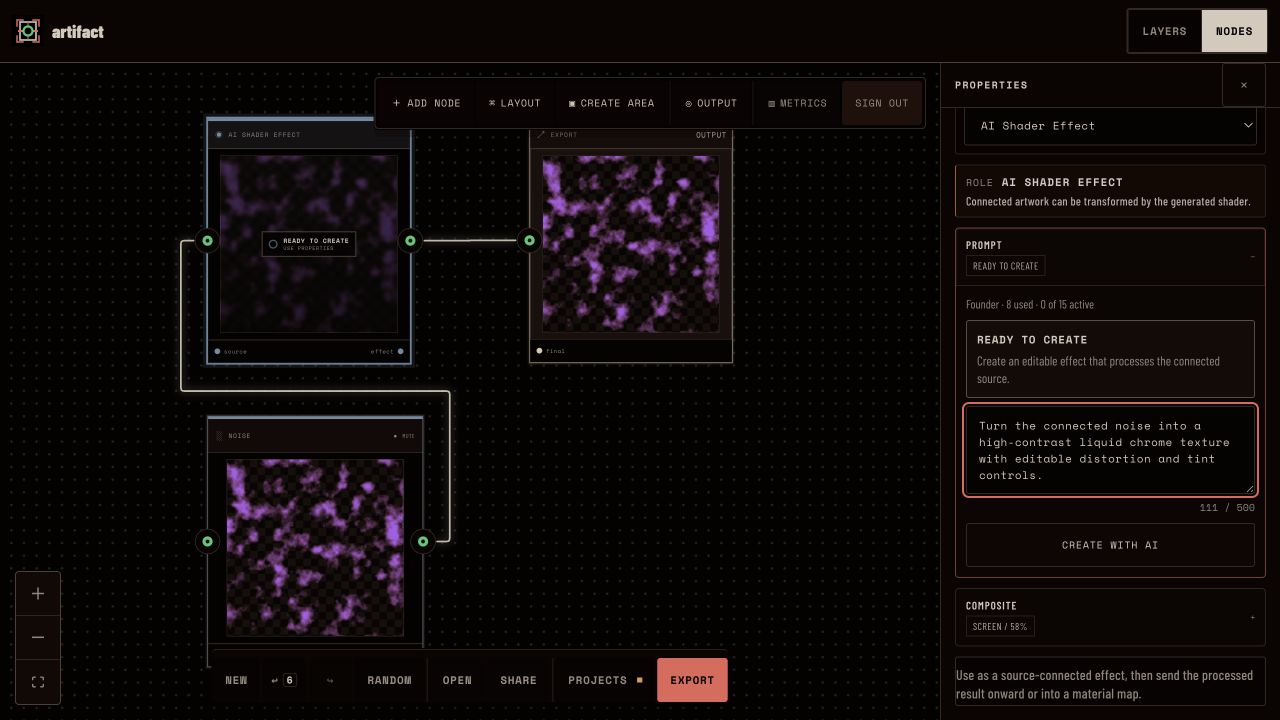
Ready with a connected source
Noise feeds the effect, the effect feeds Export, and the prompt asks for editable distortion and tint controls. The Founder account shows eight operations used before submission.
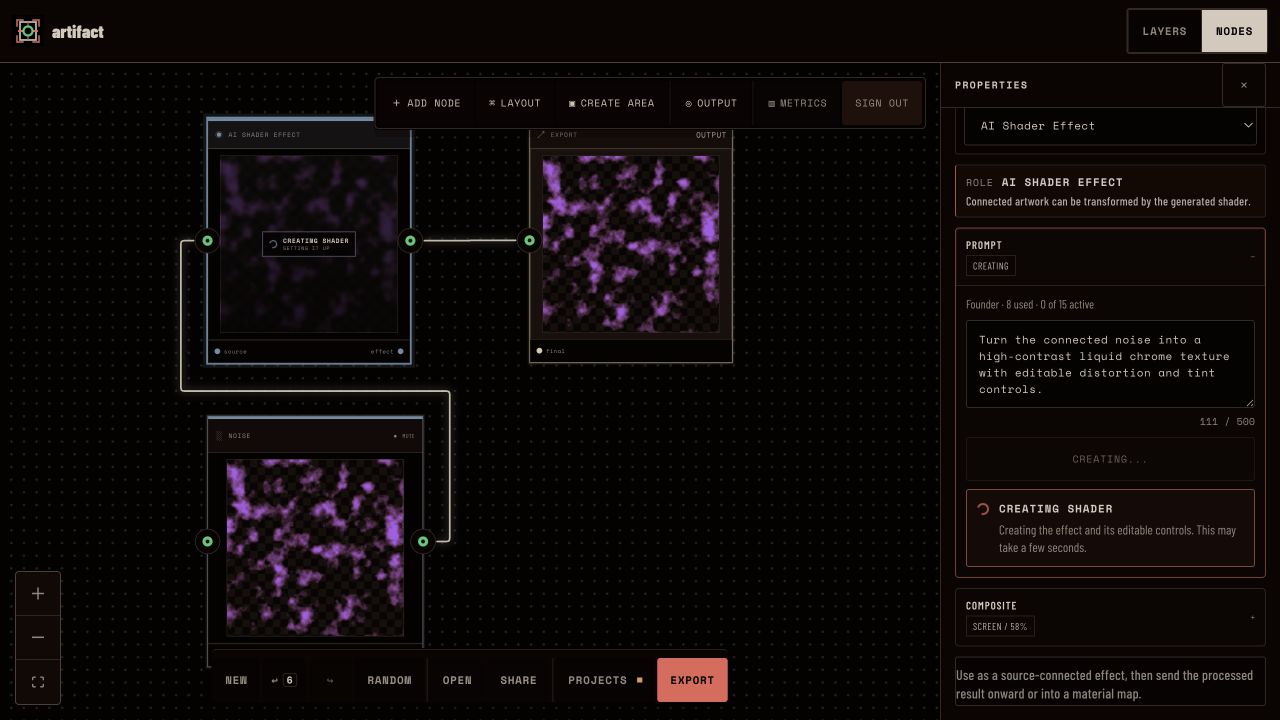
Creating without clearing the output
While the request is in progress, the connected source remains visible. Artifact waits for both the provider response and the browser acceptance result before replacing anything.
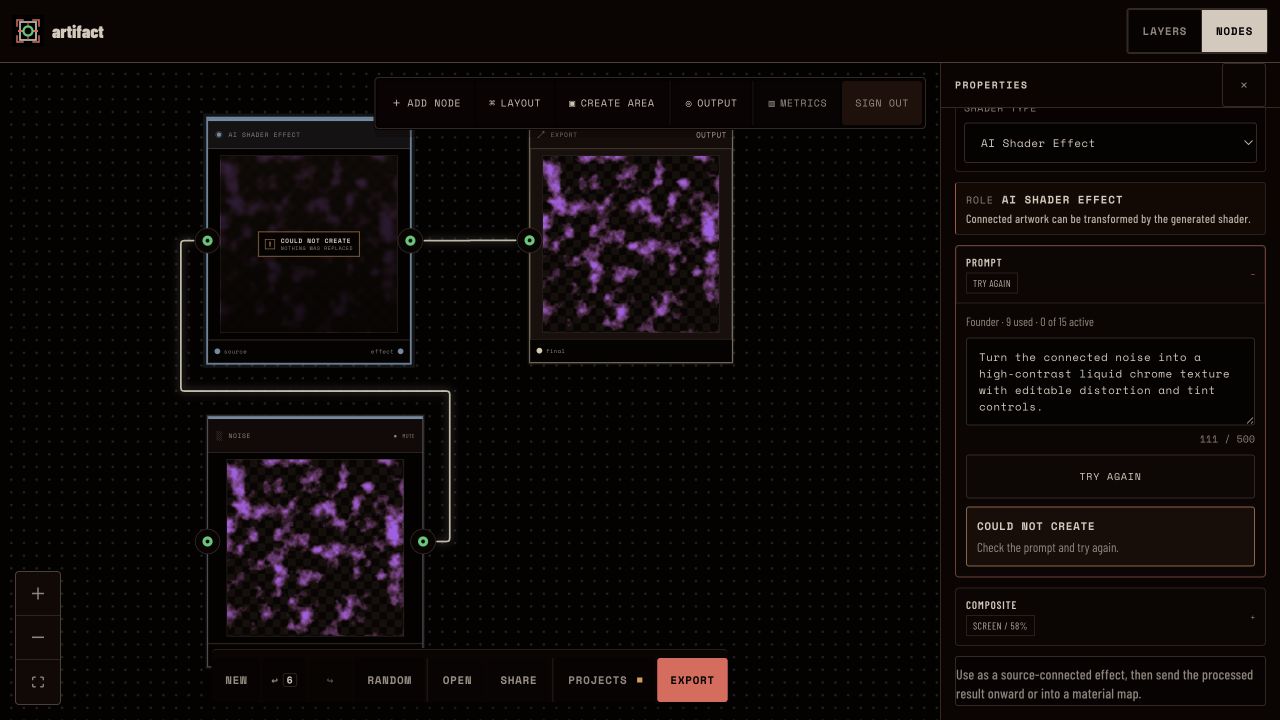
Rejected without replacement
The single authorized production call failed. Usage moved from eight to nine, the node reported that nothing was replaced, and I did not use the offered retry.
Why it matters. This run shows failure behavior, not model quality. I authorized one paid call; when it failed, Artifact preserved the document and I did not retry to manufacture a successful screenshot.
One shader, two authoring paths
Introduced in v0.40.0 · Verified in v0.41.0
Code Shader and AI Shader produce the same editable document shape; they differ in how a candidate is authored.
Artifact introduced shader authoring in v0.40.0 as two roles rather than two rendering systems. Code Shader exposes GLSL and manifest controls directly. AI Shader asks a provider to propose the same kind of definition from a prompt. In both cases, the document stores editable code, properties, and provenance instead of only a flattened image.
A provider response is only a starting point. The useful outcome is a shader that can be inspected, tuned, saved, reopened, and rendered consistently in preview and export.
Two inputs, one shader definition
Code Shader
An author writes or edits fragment GLSL directly, declares editable controls, and sees compilation diagnostics in the same node that renders the result.
AI Shader
A prompt requests the same serializable shader definition, but the provider output remains a candidate until the browser can compile and inspect it.
One renderer contract
Both paths resolve through the same preview and export semantics, so generated code does not create a second opaque rendering system.
Why it matters. The generated path remains compatible with the manual path. An author can continue working after generation instead of depending on the provider for every change.
The browser decides what to accept
Introduced in v0.40.0 · Verified in v0.41.0
Provider completion is not acceptance; the browser that renders the artwork makes the final technical decision.
The provider returns a candidate shader and an editable manifest. Artifact then compiles the code in the browser and probes whether it uses the connected source, responds to its declared properties, and produces meaningful visual variation. Transparent, flat, inert, or unrelated output does not become the active result.
A rejected first candidate can enter one bounded repair path. That repair is part of the same operation rather than an unbounded loop. If acceptance still fails, the UI exposes the failure and keeps the previous accepted result. A local fallback is explicit rather than silently presented as provider output.
Acceptance happens at the rendering boundary
Compilation
The browser compiles the candidate in the runtime that will actually render it.
Source behavior
An effect must use its connected backdrop rather than behaving like an unrelated fill.
Editable influence
Declared number, boolean, and color controls must materially affect the rendered output.
Visual variation
Transparent, flat, inert, or visually unchanged candidates are rejected before commit.
Why it matters. A syntactically plausible response is not enough. The acceptance layer tests the behavior that the editor and export path actually need before generated code becomes document state.
A failed call keeps the current work
Introduced in v0.40.0 · Verified in v0.41.0
The captured production run failed, consumed one accounted operation, and left the existing output intact.
On 18 July 2026 I created a new local document, connected a Noise source through an AI Shader Effect to Export, and submitted one production prompt. The account moved from eight used operations to nine. The run ended with Could not create and the node stated that nothing was replaced.
I had authorized exactly one paid call for this evidence pass, so I did not use the offered retry. The run did not demonstrate successful production generation. It demonstrated a narrower and useful property: a failed provider operation has a visible lifecycle and leaves the document usable without a fabricated success state.
Paid operations have explicit limits
Introduced in v0.40.0 · Verified in v0.41.0
v0.41.0 added the account and operating boundary around a creative feature introduced one release earlier.
v0.40.0 established the authoring and acceptance contract. v0.41.0 kept that document and renderer behavior while adding Free, Creator, and Founder tiers, atomic operation reservations, provider usage accounting, a Safety Budget, and Backoffice controls. The release separates whether an account may start work from whether a shader candidate is good enough to commit.
These controls do not make AI Shader the default creative workflow. They make experimental paid work operable without weakening the local editor or hiding its cost and failure states.
The production boundary added in v0.41
Reserved operation
v0.41 reserves an account operation atomically before provider-backed work begins, so quota and concurrency are decided at one server boundary.
Visible accounting
The editor shows tier, used operations, and active work; Backoffice records provider usage and cost without exposing private prompts or artwork.
Safety Budget
A server-side budget can stop new paid work independently of the editor while preserving already accepted results.
Deliberate limits
Shader animation, video export, and a reusable preset library remain outside the current release claim.
Why it matters. The editor, browser validator, and operation service each own a different decision: author intent, technical acceptance, and permission to spend.
Release, implementation, and test evidence
- v0.40.0 shader authoring release (opens in new tab)
The release record for editable Code Shader and AI Shader roles, browser validation, one repair path, provenance, and preview/export parity.
- v0.41.0 account and operations release (opens in new tab)
The release record for tiers, atomic operation reservations, provider accounting, Safety Budget, Backoffice, and result-preserving denial behavior.
- Browser acceptance implementation (opens in new tab)
The client boundary that compiles a candidate, checks source and property influence, and reports acceptance or rejection before commit.
- Shader runtime browser tests (opens in new tab)
Regression coverage for source orientation, cleanup, editable controls, invalid-output rejection, and preview/output parity.
- Accepted-result refinement test (opens in new tab)
A browser test that keeps the accepted shader active until a refined candidate passes the same acceptance boundary.
Why it matters. Together, the release records, acceptance implementation, and browser tests show both the intended contract and the behavior protected beyond this single screenshot sequence.